Capture your song ideas before they slip away.
MuseMemo is the voice memo built for music. Hit record to catch a melody or a riff — then it hears the chords, key, and tempo for you and turns the take into an editable lead sheet you can actually play from.
- iPhone iOS 16+
- iPad iPadOS 16+
- Android incl. ChromeOS
- Mac macOS 10.15+
A one-time $9.99 purchase — no subscription.
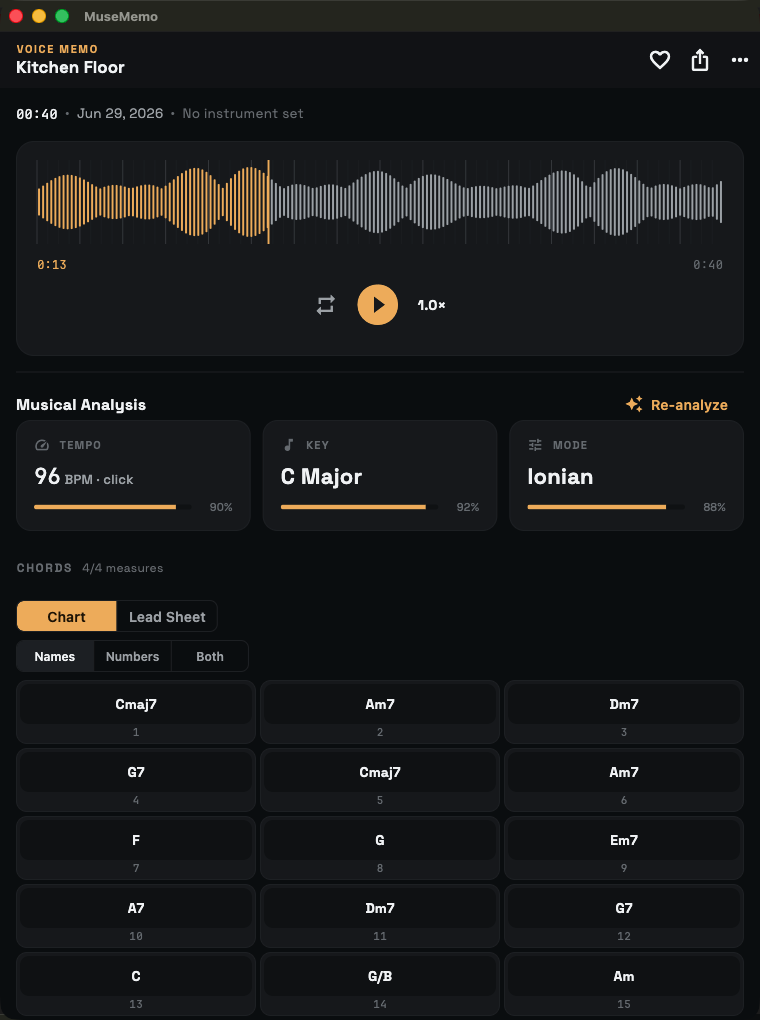
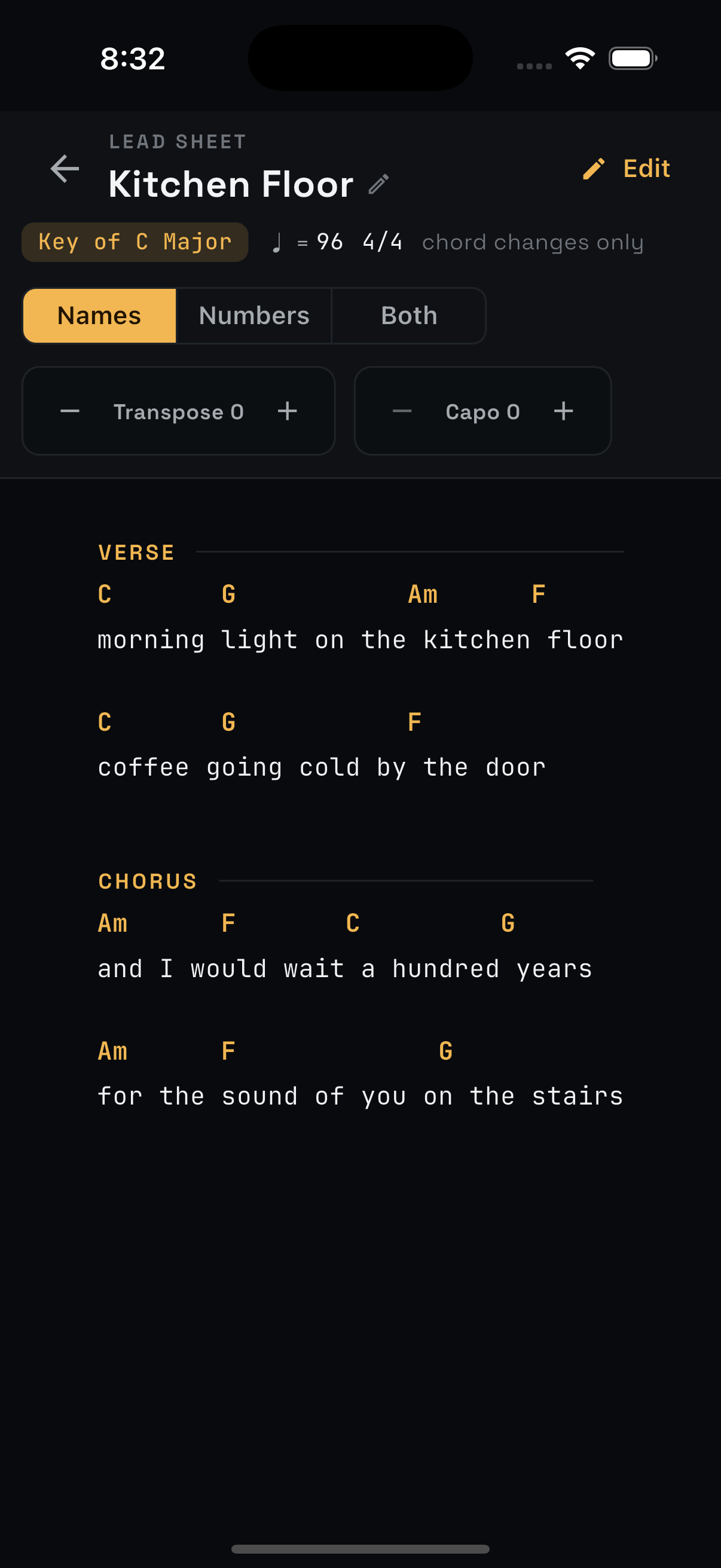
A recorder that listens like a musician.
Every songwriter has a graveyard of voice memos they can't decode months later — "what was that chord?" MuseMemo solves that. It captures the take and does the hard listening, so the idea comes back to you complete: the progression, the key, the feel, ready to refine.
One-tap capture
Record clean PCM WAV in a tap, with a built-in metronome and tuner right on the record screen. Pause, resume, and import existing takes too.
Learn more →Automatic analysis
Detects chords, key, mode, tempo, and the measure grid — all on-device, right after you stop. No internet, no waiting on a server.
Learn more →Editable lead sheets
The chart is a starting point, not gospel. Rename, drag, and split chords, add lyrics and sections, and build a clean sheet you can perform from.
Learn more →Export everywhere
ChordPro, MIDI, Ultimate Guitar, plain text, and DAW-ready WAV with the tempo baked in — your idea travels to wherever you finish songs.
Learn more →Metronome & tuner
Record against the click and MuseMemo locks the chart to your exact tempo and meter. Tune up without leaving the app.
Learn more →Private by design
Analysis runs entirely on your device. No accounts required to record, no audio uploads, no tracking inside the app.
Learn more →From hum to lead sheet in three steps.
Record the idea
Tap record and play. Run the metronome if you want the grid locked to a tempo, or just capture it raw.
Let it listen
Stop, and MuseMemo analyzes the take on-device — chords over measures, detected key and tempo, key changes and all.
Refine & export
Tidy the chords, add lyrics and sections, then export to ChordPro, MIDI, WAV, or share a chord sheet.
One app, every screen.
Buy MuseMemo once and it's yours on iPhone, iPad, and Mac — your songs sync across all of them. Here's the same workflow, from idea to lead sheet to performance.
It writes the chart so you don't have to.
MuseMemo lays your progression out as measure cells with beat ticks and downbeats, color-coded by confidence. Switch chord names to Nashville numbers in a tap, see where the key modulates, and tap any measure to hear it.
- ✓108 chord shapes, from triads to maj7 and sus voicings
- ✓Key, mode, and tempo detected automatically
- ✓Measure grid locked to your metronome or imported tempo
- ✓Every chord is editable — it is a draft, not a verdict
A better voice memo for songwriters
You don't write songs at a desk — they arrive on a walk, in a soundcheck, at 2am with a guitar. The phone recorder catches the sound but loses the music: a month later you're staring at "New Recording 47" with no idea what you played. MuseMemo is built for exactly that moment. It keeps your takes organized in folders with tags, searchable by name, key, tempo, or even the chords inside them, and it remembers what the idea actually was.
Because the analysis is on-device, it works on the subway, in the back of a van, on a plane — anywhere the songs show up. And when an idea is ready to grow, it leaves MuseMemo cleanly: a ChordPro chart for your binder, a MIDI sketch for your DAW, or a tempo-stamped WAV that drops into Logic or Ableton at the right BPM.
Frequently asked questions
What is MuseMemo?
MuseMemo is a song-idea recorder for singer-songwriters. You capture a take — voice, guitar, piano, anything — and it works out the chords, key, and tempo on your device, then gives you an editable lead sheet you can play from and export.
Does it really figure out the chords by itself?
Yes. After you stop recording, MuseMemo analyzes the audio on-device and lays out a chord chart over a measure grid, with the detected key and tempo. The chords are smart suggestions you can rename, move, or delete — you stay in control.
Which devices does MuseMemo run on?
iPhone and iPad (iOS/iPadOS 16+), Android phones and tablets including ChromeOS, and Mac (macOS 10.15+). One App Store purchase covers your iPhone, iPad, and Mac; the Android version on Google Play is a separate purchase.
Does my audio get uploaded anywhere?
No. All recording and analysis happen on your device. MuseMemo makes no network calls for analysis, and your recordings never leave your phone unless you choose to export or share them.
How much does it cost?
MuseMemo is a one-time $9.99 purchase — no subscription. The price is shown in your local currency on the App Store and Google Play, and payment is handled by Apple or Google.
Start capturing the songs in your head.
MuseMemo is a one-time $9.99 purchase — yours forever. No subscription, no ads.
- iPhone iOS 16+
- iPad iPadOS 16+
- Android incl. ChromeOS
- Mac macOS 10.15+