From rough chart to a sheet you can perform.
MuseMemo turns the detected chords into an editable lead sheet — add your lyrics and sections, tidy the chords, and you've got a chart you can play from or hand to a bandmate.
A real editor, built for touch and pointer
Every control is visible — no hidden hover menus. Drag a chord to slide it along the line, tap to rename it inline, or delete it with a tap. Split a line, merge it back, type lyrics with Tab to advance, and pick a section header per line.
- ✓Seeded from your detected chords — never a blank page
- ✓Drag, rename, split, merge — works the same on phone and Mac
- ✓Lyrics line up under chords with a shared column model
- ✓Tap a chord in view mode to hear its exact span
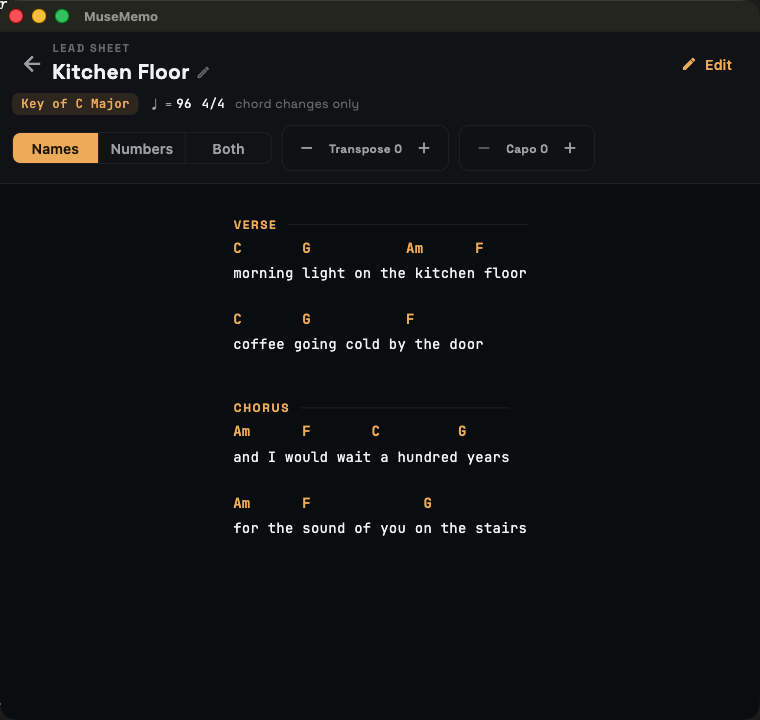
What you see is what you export
The on-screen sheet and the exported file share the same chord-over-lyric layout, so a ChordPro or Ultimate Guitar export matches your chart exactly. Start from a detected chord chart, refine it here, and send the finished sheet wherever you keep your songs.
Frequently asked questions
Where do the chords come from?
The lead sheet is seeded from the chords MuseMemo detected in your recording, so you start with a real chart instead of a blank page. From there it is fully independent — edit it freely without changing the analysis.
Can I add lyrics and section labels?
Yes. Type lyrics line by line, slide the indent to line words up under chords, and label sections (Intro, Verse, Pre-Chorus, Chorus, Bridge, Break, Outro, or your own).
Does tapping a chord play it?
In view mode, tapping a chord plays its exact span from the recording, because each chord remembers the time range it came from.
Can I export the lead sheet?
Yes — your lead sheet becomes the source for ChordPro, Ultimate Guitar, and plain-text exports, so what you see on screen is what you get in the file.
Make the sheet, keep the song.
MuseMemo is a one-time $9.99 purchase — yours forever. No subscription, no ads.
- iPhone iOS 16+
- iPad iPadOS 16+
- Android incl. ChromeOS
- Mac macOS 10.15+